

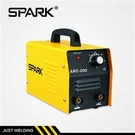



Embarking on the journey of using a Digital MIG Welding Machine for the first time can be both exciting and daunting. As a trusted supplier of high - quality Digital MIG Welding Machines, I'm here to guide you through the process of setting up your machine correctly. This guide will walk you through each step, ensuring that you're well - equipped to start your welding projects safely and efficiently.


Step 1: Choose the Right Machine
Before you start the setup process, it's crucial to select the appropriate Digital MIG Welding Machine for your needs. We offer a range of machines to suit different welding requirements. For instance, the Single PCB MIG Welding Machine with Compact Torch is a great choice for small - scale projects and tight spaces due to its compact design. If you need more power and flexibility, the Three PCB MOS MIG Welding Machine might be the ideal option. And for those who prefer a more modular setup, the Single PCB MIG Welding Machine with Separate Torch provides the flexibility to work in various configurations.
Step 2: Prepare Your Workspace
A proper workspace is essential for safe and effective welding. First, find a well - ventilated area. Welding produces fumes that can be harmful if inhaled in large quantities. Ensure that there is good air circulation, either by working outdoors or using exhaust fans indoors.
Clear the workspace of any flammable materials. Keep a fire extinguisher nearby, just in case. Also, make sure the floor is clean and dry to prevent slips and falls. Set up a stable workbench or table where you can place your welding machine and workpieces.
Step 3: Inspect the Machine
Before you start the setup, carefully inspect the Digital MIG Welding Machine. Check for any visible damage to the machine, cables, or torch. Look for loose connections, frayed wires, or any signs of wear and tear. If you notice any issues, do not attempt to use the machine. Contact our technical support team for assistance.
Step 4: Connect the Power Supply
Connect the welding machine to a suitable power source. Make sure the power source matches the voltage requirements of the machine. Check the machine's manual for the specific voltage and amperage ratings. Use a grounded electrical outlet to prevent electrical shocks.
It's recommended to use a dedicated circuit for the welding machine to avoid overloading other electrical devices. If you're using an extension cord, ensure it is of the appropriate gauge and length to handle the machine's power requirements.
Step 5: Install the Gas Cylinder
Most Digital MIG Welding Machines use a shielding gas to protect the weld from contaminants. Select the appropriate shielding gas for your welding project. Common gases include argon, carbon dioxide, or a mixture of both.
Attach the gas regulator to the gas cylinder. Make sure the regulator is tightened securely. Connect the gas hose from the regulator to the welding machine. Check for any gas leaks by applying a soapy water solution to the connections. If you see bubbles forming, there is a leak. Tighten the connections or replace any faulty parts.
Step 6: Load the Welding Wire
Open the wire feed compartment of the welding machine. Select the appropriate welding wire for your project. The wire diameter should match the thickness of the material you're welding.
Insert the wire spool into the wire feed compartment. Thread the wire through the wire guide, drive rolls, and liner. Make sure the wire is fed smoothly without any kinks or tangles. Adjust the wire tension according to the machine's manual.
Step 7: Set the Welding Parameters
The welding parameters, such as voltage, wire feed speed, and gas flow rate, need to be set correctly for a successful weld. These settings depend on several factors, including the type and thickness of the material, the welding wire diameter, and the shielding gas.
Refer to the machine's manual or welding parameter chart to determine the appropriate settings. Start with the recommended settings and make adjustments as needed based on the appearance of the weld. A good weld should have a smooth, uniform bead with no signs of spatter or porosity.
Step 8: Connect the Ground Clamp
Attach the ground clamp to the workpiece. Make sure the connection is clean and secure. The ground clamp provides a path for the electrical current to flow through the workpiece, completing the welding circuit.
Step 9: Test the Machine
Before you start welding on your actual project, it's a good idea to test the machine on a scrap piece of material. Turn on the welding machine and set the gas flow rate. Press the trigger on the torch to start the wire feed and gas flow. Check if the wire is feeding smoothly and the arc is stable.
If the arc is unstable or there are issues with the wire feed, adjust the welding parameters accordingly. Once you're satisfied with the test weld, you're ready to start your actual project.
Step 10: Safety Precautions
Throughout the welding process, it's crucial to follow safety precautions. Wear appropriate personal protective equipment (PPE), including a welding helmet with a proper shade lens, welding gloves, a welding jacket, and safety glasses.
Avoid touching the electrode, workpiece, or any hot parts of the machine during or immediately after welding. Keep your hands and body away from the arc to prevent burns. After you're done welding, turn off the machine, disconnect the power supply, and close the gas cylinder valve.
Conclusion
Setting up a Digital MIG Welding Machine for the first time may seem complex, but by following these steps, you can ensure a smooth and successful setup. Our range of Digital MIG Welding Machines, such as the Single PCB MIG Welding Machine with Compact Torch, Three PCB MOS MIG Welding Machine, and Single PCB MIG Welding Machine with Separate Torch, are designed to provide reliable and efficient performance for all your welding needs.
If you're interested in purchasing a Digital MIG Welding Machine or have any questions about the setup process, please feel free to contact us. Our team of experts is ready to assist you in selecting the right machine and ensuring that you get the most out of your welding experience.
References
- Welding Handbook, American Welding Society
- Digital MIG Welding Machine User Manuals