


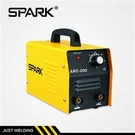


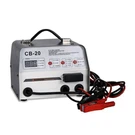
Calibrating a Three PCB MIG Welding Machine is a crucial process that ensures the machine operates at its optimal performance, delivering high - quality welds consistently. As a supplier of Three PCB MIG Welding Machines, I understand the importance of this calibration process and am here to guide you through it.
Understanding the Basics of a Three PCB MIG Welding Machine
Before diving into the calibration process, it's essential to understand what a Three PCB MIG Welding Machine is. This type of welding machine is equipped with three printed circuit boards (PCBs) that control different aspects of the welding process. These PCBs manage functions such as power regulation, wire feed speed, and gas flow, all of which are vital for a successful weld.
Pre - Calibration Checks
- Inspect the Machine
- Before starting the calibration, visually inspect the welding machine for any signs of damage. Check the cables for cuts or frays, and ensure that all the connections are tight. Loose connections can lead to inconsistent welding performance and even pose a safety hazard.
- Examine the wire feeder. Make sure the wire is feeding smoothly without any jams. A jammed wire can cause irregular welds and may damage the wire feeder mechanism.
- Check the Gas Supply (if applicable)
- If your Three PCB MIG Welding Machine uses a shielding gas, check the gas cylinder. Ensure that there is an adequate supply of gas and that the pressure regulator is functioning correctly. Incorrect gas flow can result in porosity in the weld, which weakens the joint.
Calibrating the Power Output
- Understand the Power Requirements
- Different welding applications require different power outputs. Refer to the welding machine's manual to determine the appropriate power settings for the type of metal you are welding and the thickness of the material. For example, welding thin sheets of aluminum will require a lower power output compared to welding thick steel plates.
- Use a Multimeter
- To accurately calibrate the power output, you can use a multimeter. Set the multimeter to measure voltage and connect it to the output terminals of the welding machine.
- Start the welding machine and gradually adjust the power control knob. Monitor the voltage reading on the multimeter. Compare the reading with the values specified in the manual. If the reading is off, make small adjustments to the power control until the correct voltage is achieved.
Calibrating the Wire Feed Speed
- Determine the Correct Wire Feed Speed
- The wire feed speed is critical for producing a good weld. It depends on factors such as the type of wire, the power output, and the welding technique. Generally, a faster wire feed speed is required for higher power settings and thicker materials.
- You can refer to the wire manufacturer's recommendations for the optimal wire feed speed. These recommendations are usually based on the wire diameter and the type of metal.
- Test the Wire Feed
- Place a piece of scrap metal on the welding table. Start the welding machine and set the wire feed speed to a low setting. Initiate the welding process and observe the weld bead. If the wire is not melting properly or is sticking to the metal, the wire feed speed may be too slow.
- Gradually increase the wire feed speed in small increments. Keep testing the weld on the scrap metal until you achieve a smooth, consistent weld bead. The weld bead should be uniform in width and have a good penetration into the metal.
Calibrating the Gas Flow (if applicable)
- Adjust the Gas Flow Rate
- The gas flow rate is measured in cubic feet per hour (CFH) or liters per minute (LPM). Refer to the welding machine's manual to determine the correct gas flow rate for your specific welding application.
- Use the gas flow regulator on the welding machine to adjust the flow rate. You can use a flow meter to measure the actual gas flow. Compare the measured flow rate with the recommended value and make adjustments as necessary.
- Check for Gas Leaks
- After adjusting the gas flow rate, check for any gas leaks. You can use a soapy water solution to detect leaks. Apply the soapy water to the gas connections and hoses. If you see bubbles forming, there is a leak. Tighten the connections or replace any damaged hoses to fix the leak.
Fine - Tuning the Calibration
- Perform Test Welds
- Once you have calibrated the power output, wire feed speed, and gas flow (if applicable), perform a series of test welds on scrap metal. Examine the welds closely for any defects such as porosity, lack of fusion, or excessive spatter.
- If you notice any defects, make small adjustments to the calibration settings. For example, if there is excessive spatter, you may need to adjust the wire feed speed or the power output.
- Document the Calibration Settings
- It's a good practice to document the calibration settings for future reference. This will help you reproduce the same settings for similar welding jobs and ensure consistency in your welding results.
Importance of Regular Calibration
Regular calibration of your Three PCB MIG Welding Machine is essential for several reasons. Firstly, it ensures the quality of your welds. A well - calibrated machine produces consistent, high - quality welds that meet industry standards.
Secondly, calibration helps to extend the lifespan of the welding machine. By operating the machine at the correct settings, you reduce the wear and tear on the components, which can save you money on repairs and replacements in the long run.
Finally, a calibrated welding machine is safer to use. Incorrect settings can lead to overheating, electrical malfunctions, and other safety issues. By keeping the machine properly calibrated, you minimize these risks.
Related Products
If you are interested in exploring different types of MIG welding machines, we offer a range of products. Check out our MIG Welding Machine With Wheel, which provides easy mobility for on - site welding jobs. Our Gasless MIG Welding Machine is a great option for applications where using a shielding gas is not practical. And for those who need a machine with a larger wire capacity, our 5 Kgs Wire Welding Machine is a reliable choice.


Contact for Purchase and Consultation
If you have any questions about calibrating your Three PCB MIG Welding Machine or are interested in purchasing one of our products, we encourage you to contact us. Our team of experts is ready to assist you with all your welding needs, from choosing the right machine to providing after - sales support.
References
- Welding Machine Manuals: The official manuals provided with the Three PCB MIG Welding Machine are a valuable source of information for calibration procedures and technical specifications.
- Welding Industry Standards: Industry standards such as AWS (American Welding Society) standards provide guidelines on welding processes and quality control, which are relevant to the calibration of welding machines.
- Wire Manufacturer's Recommendations: The recommendations provided by the wire manufacturers regarding wire feed speed and other parameters are crucial for achieving optimal welding results.